
If you want to know what the Magnavox universal remote codes are, you’ve come to the right place.
If you have multiple devices in your home, you’d want to get yourself a Magnavox universal remote. This remote can be connected to different devices, and it can help you control all of them. In short, you will no longer have to worry about managing several remotes, as you’ll be able to use one remote with everything. Setting it up is also pretty simple, but you’ll need the correct Magnavox universal remote codes for this.
In this guide, we’ll walk you through the complete list of Magnavox remote codes and explain how you can use them to program your universal remote.
Quick Answer
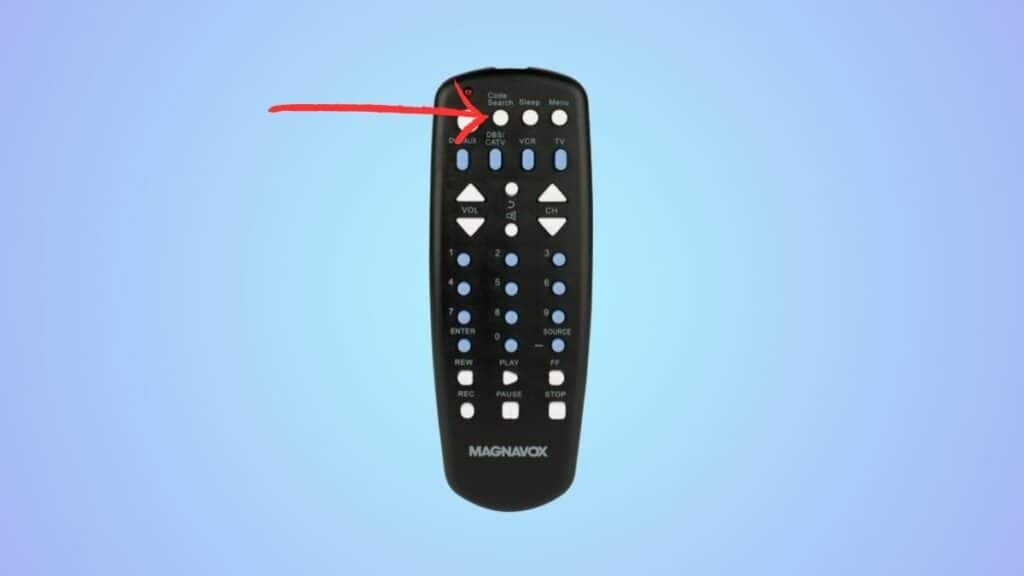
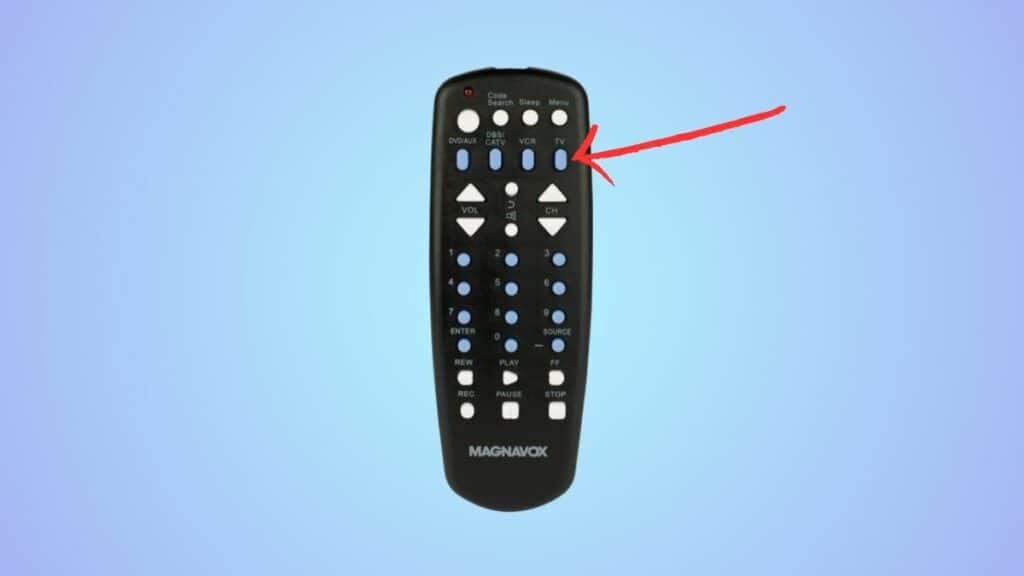
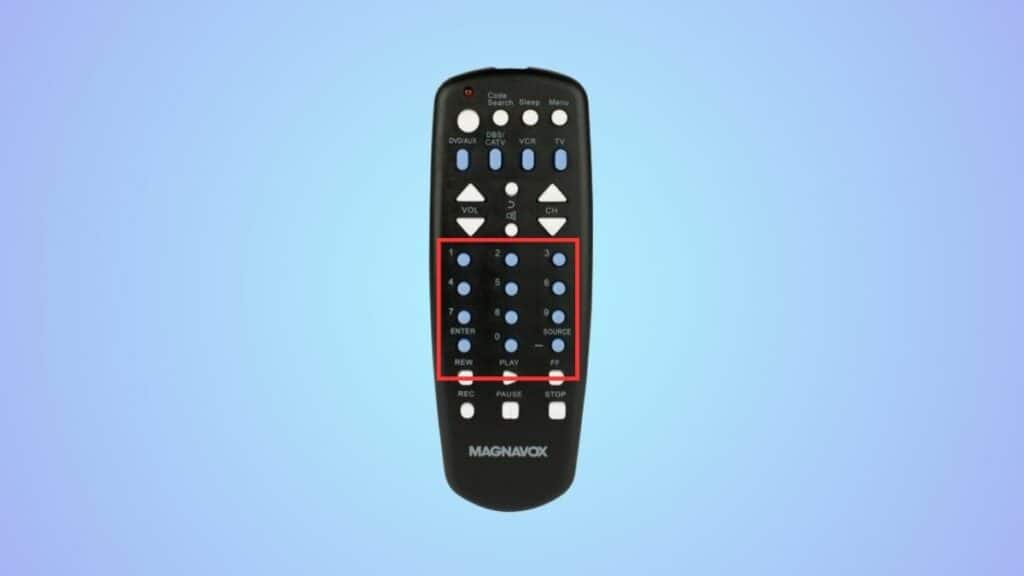
Turn on your device > press and hold the Code Search button > let go of the button after you see a light > press the device button > use the numeric keys to enter the code.
Magnavox universal remote codes list
Here’s a complete list of Magnavox remote codes for different devices.
Magnavox universal remote TV codes

| Brand | Codes |
| Admiral | 0129, 0130 |
| Advent | 0036 |
| Akai | 0102, 0117, 0034, 0090 |
| AOC | 0058, 0063, 0093, 0096, 0024 |
| Apex Digital | 0133, 0037, 0049, 0020 |
| Audiovox | 0127, 0044, 0080, 0081, 0087, 0099 |
| Aventura | 0040 |
| Broksonic | 0130, 0090 |
| Carver | 0123 |
| Celebrity | 0043 |
| Celera | 0037 |
| Changhong | 0037 |
| Citizen | 0132, 0090 |
| Coby | 0067, 0009, 0011, 0134, 0135, 0014 |
| Commercial Solutions | 0122, 0100 |
| CRAIG | 0012, 0013 |
| Crosley | 0043, 0123 |
| Curtis | 0015, 0023 |
| Curtis Mathes | 0100, 0123, 0127, 0129, 0132, 0034, 0039, 0041 |
| Daewoo | 0127, 0041 |
| Dell | 0119 |
| Denon | 0039 |
| Dumont | 0124 |
| Durabrand | 0130, 0038, 0040 |
| Dynex | 0042, 0094, 0002 |
| Electroband | 0043 |
| Electrograph | 0116 |
| Electrohome | 0130, 0071 |
| Element | 0073, 0088, 0001 |
| Emerson | 0114, 0127, 0130, 0038, 0040, 0041, 0059, 0070, 0091 |
| Emprex | 0060 |
| Envision | 0058, 0063, 0093, 0096 |
| ESA | 0102, 0040, 0091 |
| Funai | 0043, 0040, 0091 |
| Gateway | 0116 |
| GE | 0121, 0122, 0100, 0126, 0127, 0038 |
| GFM | 0040, 0070, 0091, 0000 |
| Gibralter | 0124 |
| GoldStar | 0038 |
| Haier | 0078, 0079, 0010 |
| Hallmark | 0038 |
| Hannspree | 0056 |
| Harman/Kardon | 0123 |
| Havermy | 0129 |
| Hello Kitty | 0127 |
| Hisense | 0133, 0069, 0097, 0016 |
| Hitachi | 0111, 0039 |
| Ilo | 0059, 0070, 0072 |
| Infinity | 0123 |
| Insignia | 0103, 0120, 0130, 0040, 0069, 0074, 0089, 0091, 0094 |
| Inteq | 0124 |
| JBL | 0123 |
| JCB | 0043 |
| Jensen | 0036 |
| JVC | 0130, 0035, 0051, 0065, 0082, 0007 |
| KDS | 0061, 0073 |
| KLH | 0037 |
| LG | 0103, 0122, 0124, 0038, 0017, 0021, 0026, 0027 |
| LXI | 0100, 0123, 0125, 0038 |
| MAG | 0061, 0073 |
| Magnavox | 0110, 0115, 0116, 0123, 0126, 0040, 0044, 0058, 0086, 0091, 0018 |
| Marantz | 0110, 0123 |
| Matsushita | 0106 |
| Maxent | 0116 |
| MB Quart | 0087 |
| Megatron | 0038, 0039 |
| Memorex | 0130, 0131, 0038, 0071, 0089 |
| MGA | 0131, 0038 |
| Midland | 0100, 0124, 0126 |
| Mitsubishi | 0128, 0129, 0131, 0038 |
| Motorola | 0129 |
| MTC | 0132 |
| NAD | 0125, 0038 |
| NEC | 0084 |
| NetTV | 0116 |
| Nexus Electronics | 0001 |
| Nikko | 0038 |
| Norcent | 0133, 0058, 0063 |
| Olevia | 0113, 0050, 0055 |
| Optimus | 0106 |
| Optoma | 0056 |
| Optonica | 0129 |
| Orion | 0130, 0042 |
| Panasonic | 0105, 0106, 0109, 0126, 0053, 0007 |
| PARK | 0098, 0004 |
| Penney | 0100, 0125, 0126, 0132, 0038 |
| Petters | 0118 |
| Philco | 0123, 0040, 0059, 0070, 0091 |
| Philips | 0110, 0115, 0123, 0077, 0086, 0018, 0019 |
| Pioneer | 0109 |
| Polaroid | 0118, 0037, 0052, 0061, 0073, 0080, 0081, 0099 |
| Portland | 0127, 0041 |
| Prima | 0036 |
| Prism | 0126 |
| Proscan | 0122, 0100, 0006 |
| Proton | 0038 |
| Proview | 0061, 0073 |
| Pulsar | 0124 |
| Quasar | 0106, 0126 |
| RadioShack | 0100, 0038 |
| RCA | 0121, 0122, 0100, 0126, 0129, 0041, 0083, 0003, 0005, 0022, 0028 |
| Realistic | 0038 |
| Runco | 0124 |
| Sampo | 0116 |
| Samsung | 0102, 0132, 0034, 0038, 0047, 0095, 0031, 0032, 0033 |
| Sansui | 0130, 0040, 0071, 0089, 0090 |
| Sanyo | 0123, 0048 |
| Sceptre | 0045, 0049, 0057, 0064, 0025 |
| Scotch | 0038 |
| Scott | 0038, 0075 |
| Sears | 0100, 0123, 0125, 0038, 0040 |
| Sharp | 0107, 0129 |
| Sheng Chia | 0129 |
| Signature | 0123 |
| Sony | 0101, 0043, 0029, 0030 |
| Soundesign | 0038 |
| Soyo | 0085 |
| Spectroniq | 0061, 0073 |
| Squareview | 0040 |
| Superscan | 0129 |
| Supreme | 0043 |
| SVA | 0133, 0091 |
| Sylvania | 0114, 0123, 0040, 0059, 0070, 0088, 0091 |
| Symphonic | 0040 |
| Syntax | 0113, 0050, 0055 |
| Tandy | 0129 |
| TCL | 0514 |
| Technics | 0106, 0126 |
| Techwood | 0126 |
| Teknika | 0123, 0131, 0132 |
| Telefunken | 0034 |
| TMK | 0038 |
| TNCi | 0124 |
| Toshiba | 0108, 0125, 0132, 0053, 0090, 0092 |
| TVS | 0130 |
| Victor | 0035 |
| Vidikron | 0123 |
| Vidtech | 0038 |
| Viewsonic | 0116, 0046, 0054, 0058, 0062, 0066, 0068, 0076, 0093, 0096, 0008 |
| Viore | 0072, 0098, 0015 |
| Vizio | 0104, 0046 |
| Wards | 0043, 0100, 0123, 0124, 0125, 0126, 0132, 0038 |
| Waycon | 0125 |
| Westinghouse | 0112, 0127, 0046, 0049 |
| White Westinghouse | 0130, 0041 |
| Wyse | 0058 |
| Zenith | 0043, 0103, 0100, 0124, 0130, 0038, 0039, 0041, 0058 |
Magnavox universal remote streaming device codes
| Brand | Code |
| Apple TV | 0256 |
| Roku TV | 0266, 0267, 0268 |
| Xbox | 0274 |
| DirecTV | 0201, 0203, 0200, 0204, 0205 |
| Dish Network | 0202, 0209 |
| Tivo | 0205 |
| Bright House | 0216, 0217 |
| Cox | 0216, 0217 |
| Verizon | 0241 |
Magnavox universal remote DVD player codes
| Brand | Code |
| AKAI | 0428 |
| Daewoo | 0440, 0446 |
| Denon | 0406, 0466, 0517 |
| GE DVD | 0400, 0528 |
| Hitachi | 0408, 0531 |
| LG DVD Player | 0430, 0440, 0457, 0515, 0504 |
| Magnavox | 0407, 0522, 0525, 0427 |
| Panasonic | 0406, 0407, 0458, 0459, 0510 |
| Philips DVD | 0407, 0522, 0523, 0524, 0525, 0427 |
| Pioneer | 0411, 0423, 0426, 0456, 0473, 0519 |
| Samsung DVD Player | 0406, 0408, 0424, 0435, 0461 |
| Sharp | 0530, 0427, 0431, 0465, 0502 |
| Sony DVD Player | 0530, 0427, 0431, 0465, 0502 |
| TCL | 0514 |
How to program a Magnavox universal remote using codes
Now that you’ve learned what the Magnavox universal remote codes are, let’s take a look at how you can program the remote using them.
Step 1 Turn on your device
Turn on your device either by using the original remote or the manual power button.
Step 2 Start the process
Press and hold the Code Search button on the universal remote to initiate the setup process. Let go of the button after you see a light on the remote.
Step 3 Select your device
Press the device button, such as TV button, on the remote.
Step 4 Enter the code
Use the numeric keys to enter one of the codes from the tables above.
If the code is correct, the LED on the remote will turn off, and the keys will work. If the code is incorrect, the LED on the remote will blink 5 times. If that happens, you’ll have to repeat the process but enter a different code this time.
How to program a Magnavox universal remote without codes
Alternatively, you can try to connect your Magnavox universal remote to your device without using a code. This method may not work for every device, so you might have to resort to manually entering the code.
Step 1 Initiate the setup process
Turn on your device and press and hold the Code Search button on the remote for around two seconds. Let go of the button after the light on the remote turns on.
Step 2 Select your device
Next, press the device button (such as the TV or DVD button) on the remote.
Step 3 Press the power button
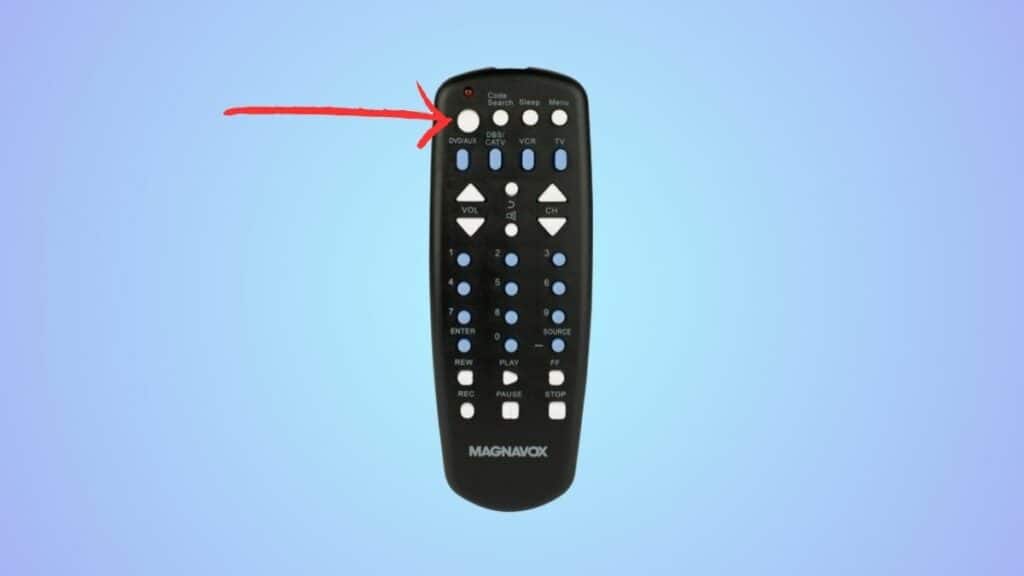
Press and hold the Power button until the light on the remote starts blinking and your device turns off. Make sure to point the remote towards the device while doing this.
Step 4 Save the code
Now, press the Enter button within four seconds to save the code.
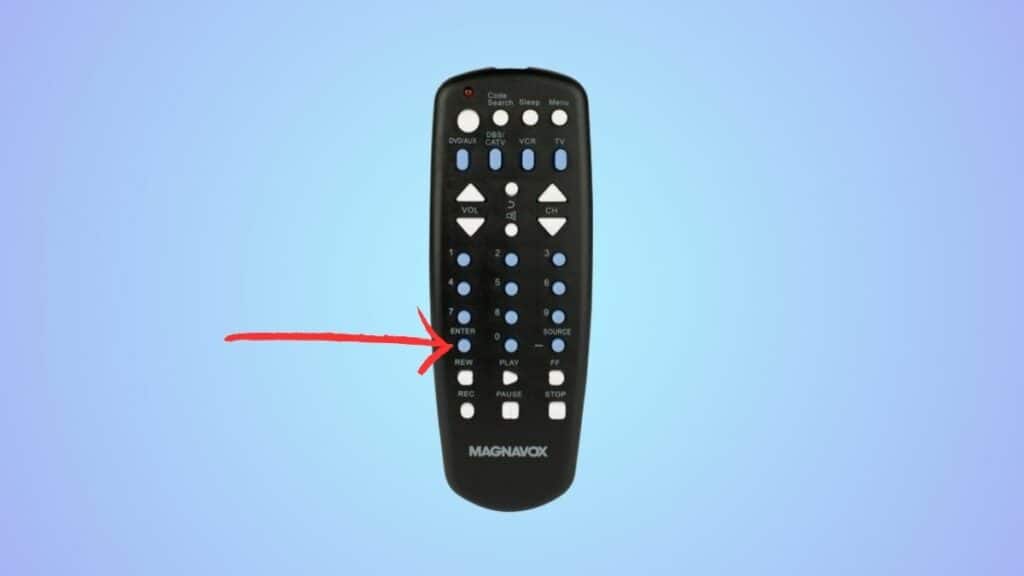
If the device doesn’t turn off, you must repeat the process from the start. You’ll need to keep doing this until the remote is able to find the correct code.
Why is my Magnavox universal remote not working?
Your remote may not be working due to weak batteries. But if replacing the batteries didn’t do anything, there may be something wrong with its hardware. In such a case, you’ll either need to get it repaired or replaced.
