
There are a few ways of going about this, both with and without codes, which we’ll take you through step-by-step below in this guide. The easiest way is with a code, which are usually 3-digits, 4-digits, or 5-digits depending on the remote model you’re using.
Generally speaking, there are few ways to go about finding the correct code for your universal remote and TV. Using extensive lists like you’ll find below can be useful, however, we’d advise checking you Hisense TV manual as it is likely to have remote codes in there. There is also an automatic code search function, that can be very useful too.
Here, we’ll take you through each method step-by-step.
Quick Answer
Turn on your Hisense TV > press and hold the device button on the universal remote > enter the code > test the remote to see if it works.
Hisense TV remote codes list
Here’s a complete list of Hisense universal remote codes.
3-digit remote codes for Hisense TV

| Hisense | RCA | GE | Spectrum |
| 759 | 042 | 073 | 004 |
| 237 | 081 | 021 | |
| 182 | 031 | ||
| 216 | 072 | ||
| 198 | |||
| 236 | |||
| 251 | |||
| 268 | |||
| 363 | |||
| 387 | |||
| 419 | |||
| 442 | |||
| 619 | |||
| 630 | |||
| 631 | |||
| 705 | |||
| 752 |
4-digit remote codes for Hisense TV
| Hisense | RCA | Philips | GE | One for All | Magnavox | Comcast | Spectrum |
| 0009 | 0178 | 0001 | 0001 | 0009 | 0016 | 0748 | 0021 |
| 0073 | 0706 | 0036 | 0073 | 0208 | 0069 | 0178 | 0041 |
| 0145 | 0748 | 0115 | 0081 | 0508 | 0097 | 1756 | 0178 |
| 0156 | 0818 | 0223 | 0182 | 0556 | 0133 | 0341 | |
| 0182 | 0885 | 0535 | 0216 | 0698 | 0411 | ||
| 0208 | 1042 | 0583 | 0671 | 0753 | 0706 | ||
| 0216 | 1138 | 0671 | 1176 | 0780 | 0885 | ||
| 0227 | 1204 | 0708 | 1651 | 0860 | 1041 | ||
| 0508 | 1237 | 0819 | 1741 | 0891 | 1228 | ||
| 0696 | 1314 | 0908 | 2081 | 1208 | 1279 | ||
| 0748 | 1602 | 1203 | 2141 | 1363 | 1314 | ||
| 0753 | 1660 | 1219 | 2211 | 1564 | |||
| 0780 | 1756 | 1651 | 2891 | 1660 | |||
| 0821 | 2049 | 1718 | 3671 | 1756 | |||
| 0848 | 2098 | 1741 | 4381 | 2049 | |||
| 1170 | 2183 | 2081 | 4391 | 2098 | |||
| 2355 | 2141 | 4671 | 2131 | ||||
| 2360 | 2211 | 5078 | 2183 | ||||
| 2419 | 2891 | 5319 | 2355 | ||||
| 2434 | 3671 | 5209 | 2360 | ||||
| 3519 | 4381 | 5284 | 2434 | ||||
| 3183 | 4391 | 5331 | 2511 | ||||
| 3382 | 5331 | 5345 | 2801 | ||||
| 4029 | 5341 | 5341 | 2971 | ||||
| 4149 | 6001 | 6001 | 3382 | ||||
| 4398 | 6161 | 6161 | |||||
| 6171 | 6171 | ||||||
| 6251 | 6251 |
5-digit remote codes for Hisense TV
| Hisense | RCA | Philips | One for All | Comcast | DirecTV | Spectrum |
| 10748 | 10178 | 10005 | 21262 | 10178 | 11314 | 10178 |
| 11758 | 10818 | 10065 | 24344 | 10706 | 11602 | 10748 |
| 12183 | 10885 | 10071 | 24525 | 10748 | 11660 | 10885 |
| 11314 | 10179 | 25612 | 10885 | 11756 | 11314 | |
| 11756 | 10258 | 26146 | 11314 | 12049 | 11564 | |
| 12049 | 10277 | 34243 | 11602 | 12098 | 11660 | |
| 12098 | 10375 | 35254 | 11660 | 12183 | 12049 | |
| 12183 | 10473 | 42224 | 11756 | 12355 | 12098 | |
| 12360 | 10571 | 43155 | 11993 | 12360 | 12183 | |
| 12419 | 10679 | 44631 | 12049 | 12360 | ||
| 12434 | 10777 | 12089 | 12434 | |||
| 12355 | 10821 | 12098 | 13382 | |||
| 13183 | 10875 | 12183 | 14398 | |||
| 13382 | 10973 | 12296 | 14740 | |||
| 13519 | 11071 | 12360 | ||||
| 14398 | 11179 | 12434 | ||||
| 11277 | 13118 | |||||
| 11375 | 13382 | |||||
| 11476 | ||||||
| 11574 | ||||||
| 11672 | ||||||
| 11422 | ||||||
| 11666 | ||||||
| 11764 | ||||||
| 11862 | ||||||
| 11960 | ||||||
| 12074 | ||||||
| 12128 | ||||||
| 12561 | ||||||
| 12846 | ||||||
| 12859 | ||||||
| 13450 | ||||||
| 13359 | ||||||
| 13846 | ||||||
| 13944 | ||||||
| 14564 | ||||||
| 14643 | ||||||
| 14662 | ||||||
| 14972 | ||||||
| 15532 | ||||||
| 15972 | ||||||
| 16070 | ||||||
| 16178 | ||||||
| 16513 | ||||||
| 16551 | ||||||
| 16703 | ||||||
| 16738 | ||||||
| 16744 | ||||||
| 16969 | ||||||
| 17206 | ||||||
| 17231 | ||||||
| 17415 | ||||||
| 17440 | ||||||
| 18247 | ||||||
| 18437 | ||||||
| 18459 | ||||||
| 18557 | ||||||
| 18655 | ||||||
| 18924 | ||||||
| 18962 | ||||||
| 19351 | ||||||
| 19367 | ||||||
| 19715 |
How to program Hisense TV with universal remote codes
Now that you know about the correct Hisense TV universal remote codes, it’s time to learn how you can program it. Keep in mind that the first code you enter may not work, so you’ll have to keep entering different codes until you enter the correct one for your TV.
Step
Turn on your Hisense TV
Turn on your Hisense TV using its remote or the manual power button.
Step
Press and hold the device button
Press and hold the device button. Depending on the model and brand of your universal remote, this button can be labeled as Code Search, TV, Setup, or Magic.
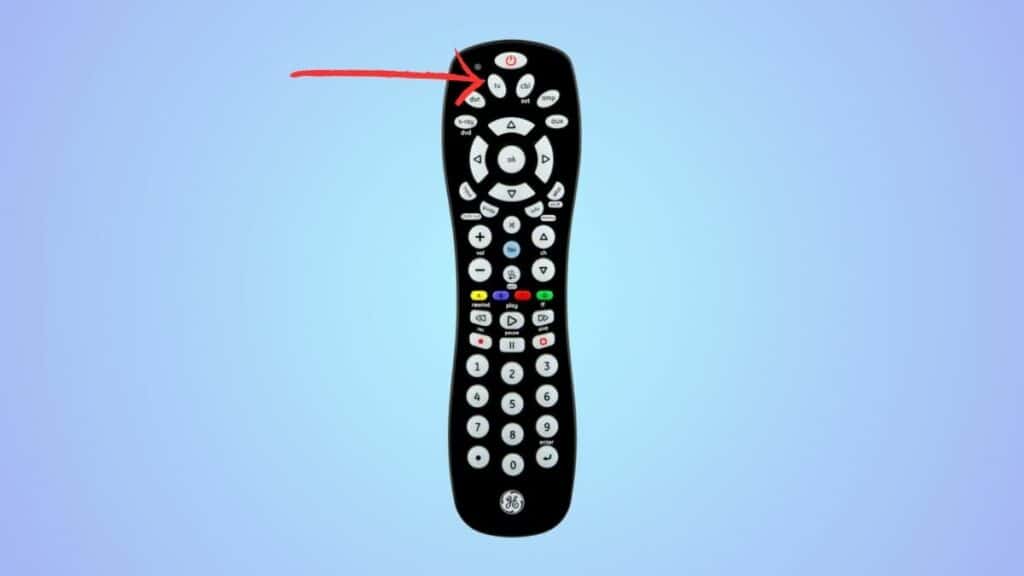
Keep holding it until you see a light on the remote.
Step
Enter the code
Next, using the numeric keys, enter one of the universal remote codes. Make sure to hold the device button while entering the codes.
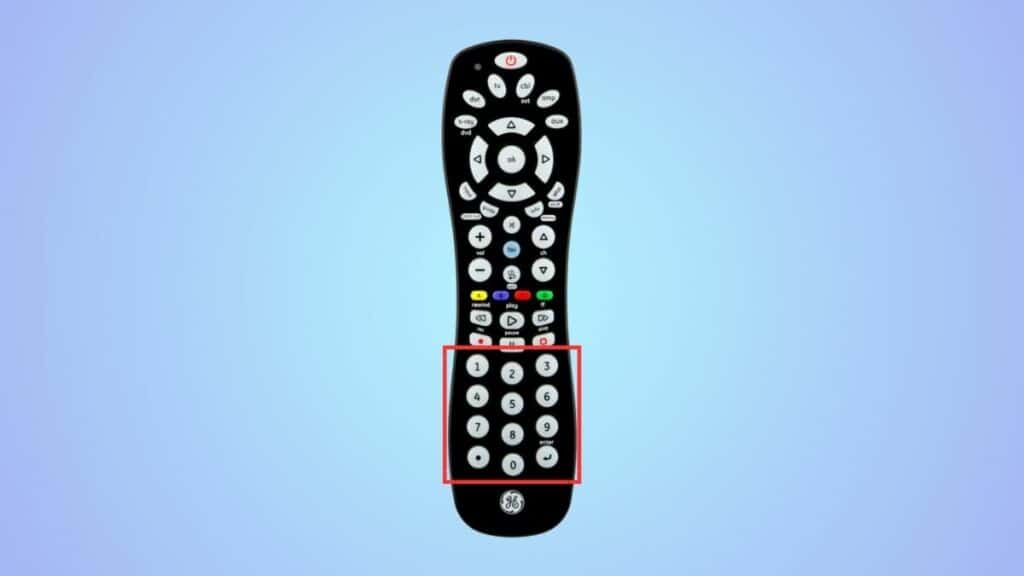
If it is correct, the LED light will flash and turn off. But if it’s incorrect, the LED light will remain on, and you’ll have to try another code.
How to program Hisense TV using the automatic code search function
Another way to connect your universal remote to your Hisense TV is by using the automatic code search function. This function is found in a couple of universal remotes, and you can try it to save time. However, keep in mind that it may not work for everyone.
Step
Initiate the process
Turn on your Hisense TV and press and hold the device button on the remote.
Step
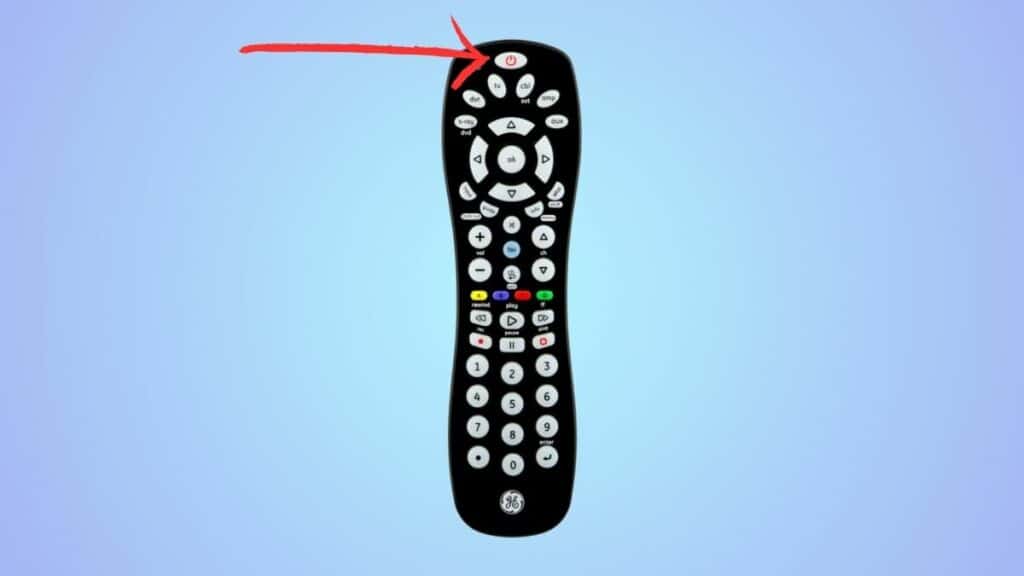
Hold the power button
Next, press and hold the power button until the LED on the remote is on. Make sure to keep holding the device button as you do this.
Step
Point your remote towards the TV
Let go of both buttons at the same time and point the universal remote towards the TV.
Step
Program the remote
Start pressing the power button constantly until your Hisense TV turns off. If it does, it means the TV found the correct code. To save it, press the device button.
Why are the Hisense TV universal remote codes not working?
If the Hisense TV universal remote code is not working, it could be due to a fault in the remote. But if the remote is fine, you may have entered the wrong code or may have accidentally let go of the device button.
Why is my Hisense TV not responding to the remote or buttons?
If the batteries of your remote are weak or if there’s something wrong with its hardware, your TV won’t respond to it. If replacing the battery doesn’t fix the issue, you’ll need to get a new remote.
